

ART GUIDELINES
FILE FORMAT
We prefer to have any artwork (including logos and text) sent to us in vector format, saved in Adobe Illustrator as a press quality PDF, or as a native .ai file. If this is not possible, we also accept Photoshop, InDesign and JPEG files. but please remember that any raster artwork (non-vector) must be 300 DPI or higher in resolution.
SIZE
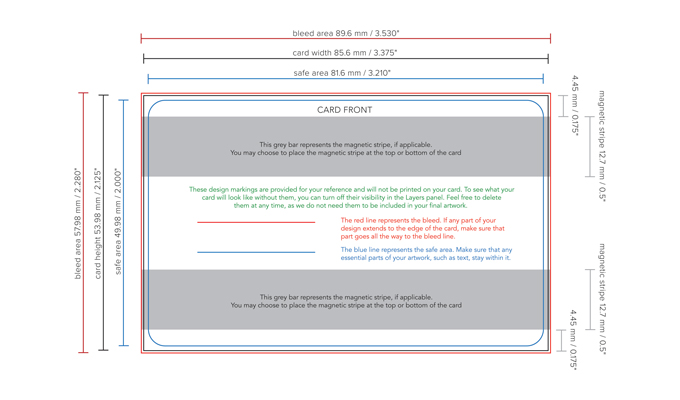
Our cards (whether keycards, business cards or gift cards) are printed in the CR80 format. This is equivalent to 3.375" x 2.125" or 85.6 mm x 53.98 mm.
Please ensure the artwork you submit keeps these exact measurements, and please do not add rounded corners to your design. Our cutting machines will take care of the corners, and you will get an opportunity to view your artwork with rounded corners in the digital proof we’ll supply before printing.
TEXT / FONTS
Please convert any text included in your design to outlines, or embed the font in your submitted document. Outlining is generally the safest way to submit text for printing, but please remember that we can not edit or add to your text (aside from changing its size or color) if it is outlined.
IMAGES
Any bitmap (raster) images included in your artwork must be 300 DPI or higher, and may be embedded or linked.
COLOR SPACE
Artwork should be submitted in CMYK format, using process colors rather than spot colors, unless separately agreed. Please see the section below on printing white and light colors for more information on special orders and how we can assist you in achieving the look you want.
BLEED / SAFE AREA
The CR80 measurements mentioned above represent the printable area of our cards.
If any part of your design extends all the way to the edge, you will need to add an extra 2 mm (0.08") to the design. (That’s the minimum, so don’t worry if your bleed is larger.)
There is also a smaller area, called the safe area, within which all essential design elements should fall. This area is 2 mm (0.08") in from the actual edges of the card.
MARKINGS
Please do not include any trim lines or other printer’s marks in your submitted files. As long as the artwork has the right measurements, and the colors are properly specified in CMYK, we’ll take care of the rest!
MAGNETIC STRIPE
If your card is to include a magnetic stripe, you should note that this is 12.7 mm (0.5") tall and runs the width of the card. It will be placed 4.45 cm (0.175") in from either the bottom or the top of the card.
PERSONALIZATION
For personalization options such as barcodes, scratch-off panels, serial numbers etc., these can be placed anywhere on the card, and if you like, you may indicate their position on a separate layer in your artwork file. Or, if you prefer, we can place them for you.
WHITE AND LIGHT ON WOOD
Without going into too many technical details (although you are more than welcome to contact us if you would like to hear them), it’s important to note that when printing on wood (rather than on a bright white substrate), the following three basic principles apply:
Anything white in your design will print as wood color
On very light colors, the wood background will also show through
Most colors will appear to contain slightly more yellow when printed on wood
When working in Adobe Illustrator or Photoshop, one way to get an idea of the difference is to place your artwork on a yellow/beige background and blend using the Multipy blending option.
At Sustainable Cards, we think this all adds to the appeal of using a natural, unbleached material like wood, and that the visual results can be stunning.
However, if you have any questions or concerns, our in-house design and pre-press team has many years’ experience of printing on wood and will happily work with you to achieve the result you are looking for.
Please contact us if you have questions or concerns, as we can assist with special order items, including:
Printing an underlayer of white for design items whose color must remain exactly the same as if printed on white paper
Advising on color compensation or other design aspects
Complete design services
MEASUREMENTS
Below is a visual representation of the way we would like you to set up your design file for best results. (You may right-click to download this .jpg image to your computer, though please note that it is not to scale.)
CONTACT US
We are always happy to answer any questions you may have on preparing your artwork for print on our beautiful wood cards. Please do not hesitate to reach out to your contact at Sustainable Cards at any time!
Download a PDF copy of our art guidelines here.